
Supply Drives & Campaigns

Run a drive your whole church can rally behind.

School supplies, coats, Christmas gifts — import your student list, print QR tags, and let members claim, shop, and return. No spreadsheets, no lost paper angels, and you watch it fill up in real time.

QR TagsPrint & Scan
No LoginFor Members
LiveFulfillment Board

Without Ministry Planner

Paper tags on a bulletin board — and a prayer nobody loses one
A who-took-which-tag spreadsheet that’s stale by Sunday lunch
Texts all week asking "what do I buy for a 3rd grader?"
No idea how many bags came back until the deadline
One coordinator carrying the whole drive in their head

With Ministry Planner

Every student is a printed QR tag — generated in one click
Members scan, claim, and shop from a list on their phone
Tags gray out the moment someone claims them
Return day is a scan station — no laptops, no logins
Claimed, returned, delivered, and dollars — tracked live
SET UP THE DRIVE

From student list to live drive in minutes.

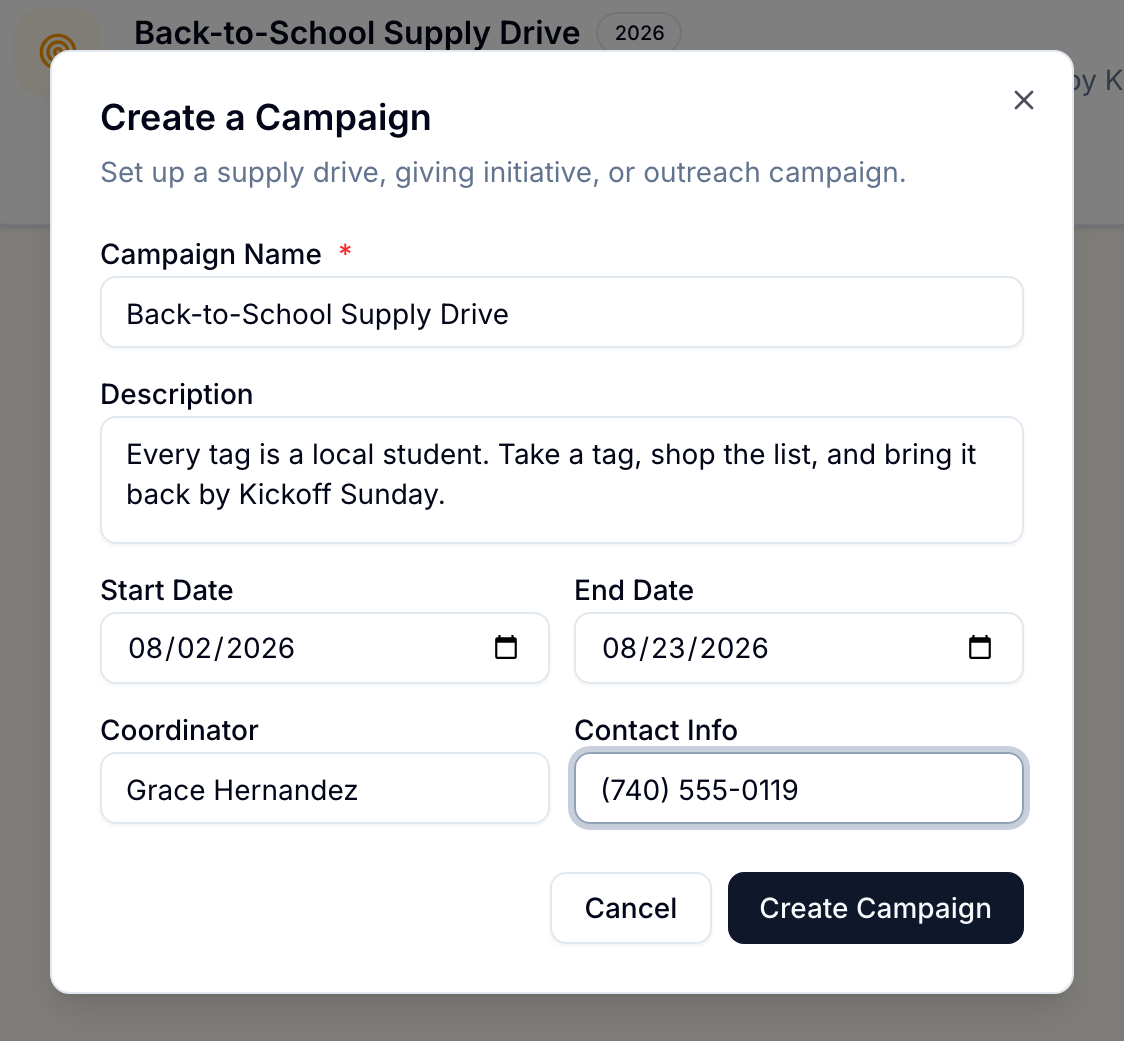
Create the drive, set a return-by date, and name a coordinator. Then import your student list from a spreadsheet — every row becomes a numbered tag with a grade-specific supply list and cost estimate attached.
Import your roster from XLSX — every student becomes a tag
Per-grade supply lists with editable items and cost estimates
Backpack add-on rule for students who need one
Lives in your Team Hub as "Campaigns" — any ministry can run one
See it live in the demo →
Create a Campaign
Church supply drive software: the Create a Campaign dialog with a Back-to-School Supply Drive named, dates set, and a coordinator assigned
PRINT QR TAGS

Print tag sheets on labels you already buy.

One click generates printable tags — each with a QR code that opens that student’s exact supply list. Pick an Avery preset or set a custom grid, filter by school or grade, and print.
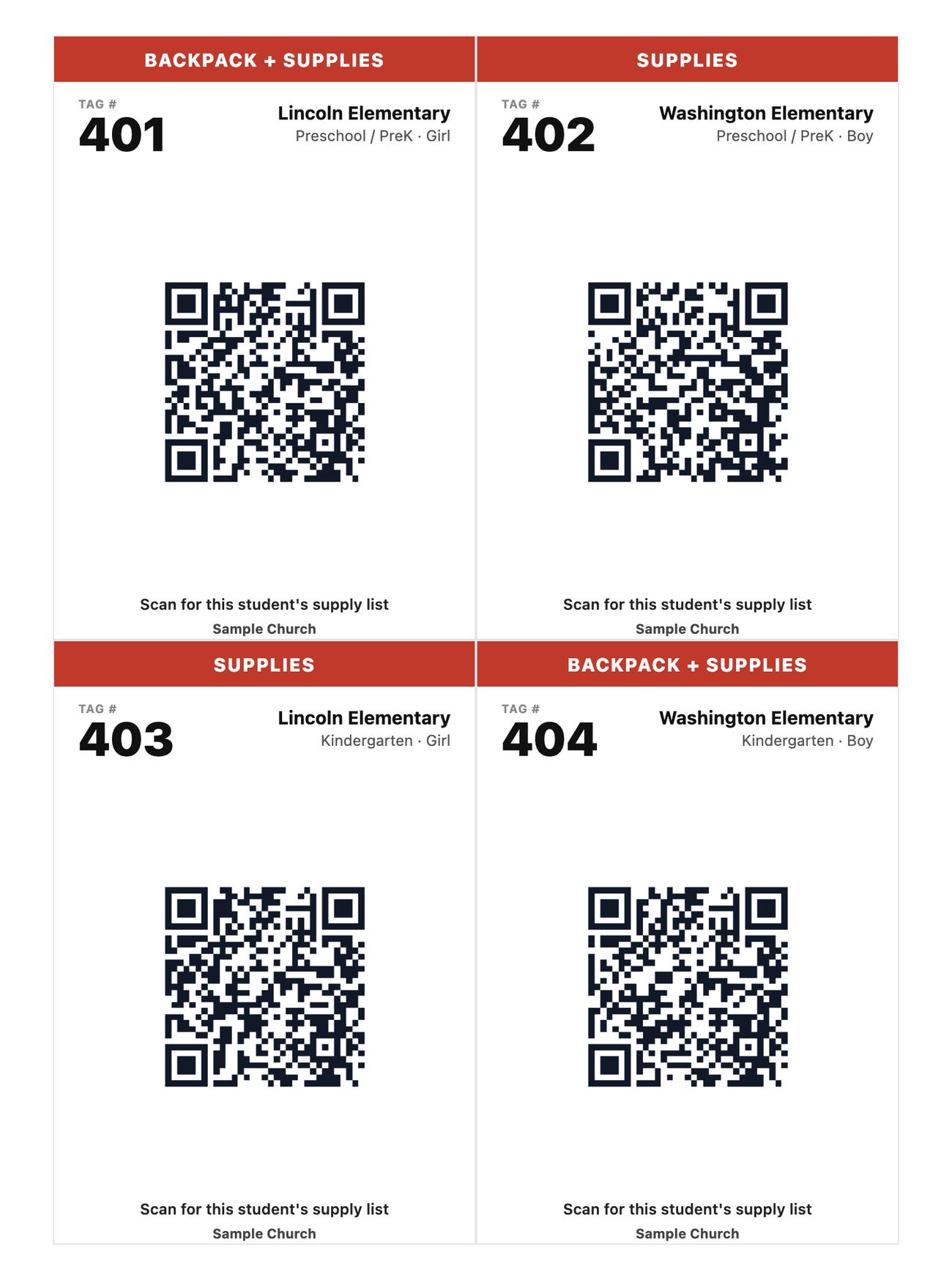
Every tag’s QR opens that student’s own claim page
Backpack-needed students flagged right on the tag banner
Your church’s name and your own call-to-action on every tag
Avery presets or a custom grid — filter by school, grade or status first
See tag printing live →
Tags — Back-to-School Supply Drive
A printed sheet of church supply drive tags on Avery 5168 labels, four to a page: each tag has a red banner reading backpack plus supplies or supplies, a large tag number, the student's school and grade, a QR code, the call-to-action "Scan for this student's supply list", and the church's name
SHARE ONE LINK

Your whole church shops from one link.

The public drive page carries your church’s name, logo, and colors. Members browse open tags, filter by school or grade, and see exactly what’s still needed — claimed tags gray out automatically.
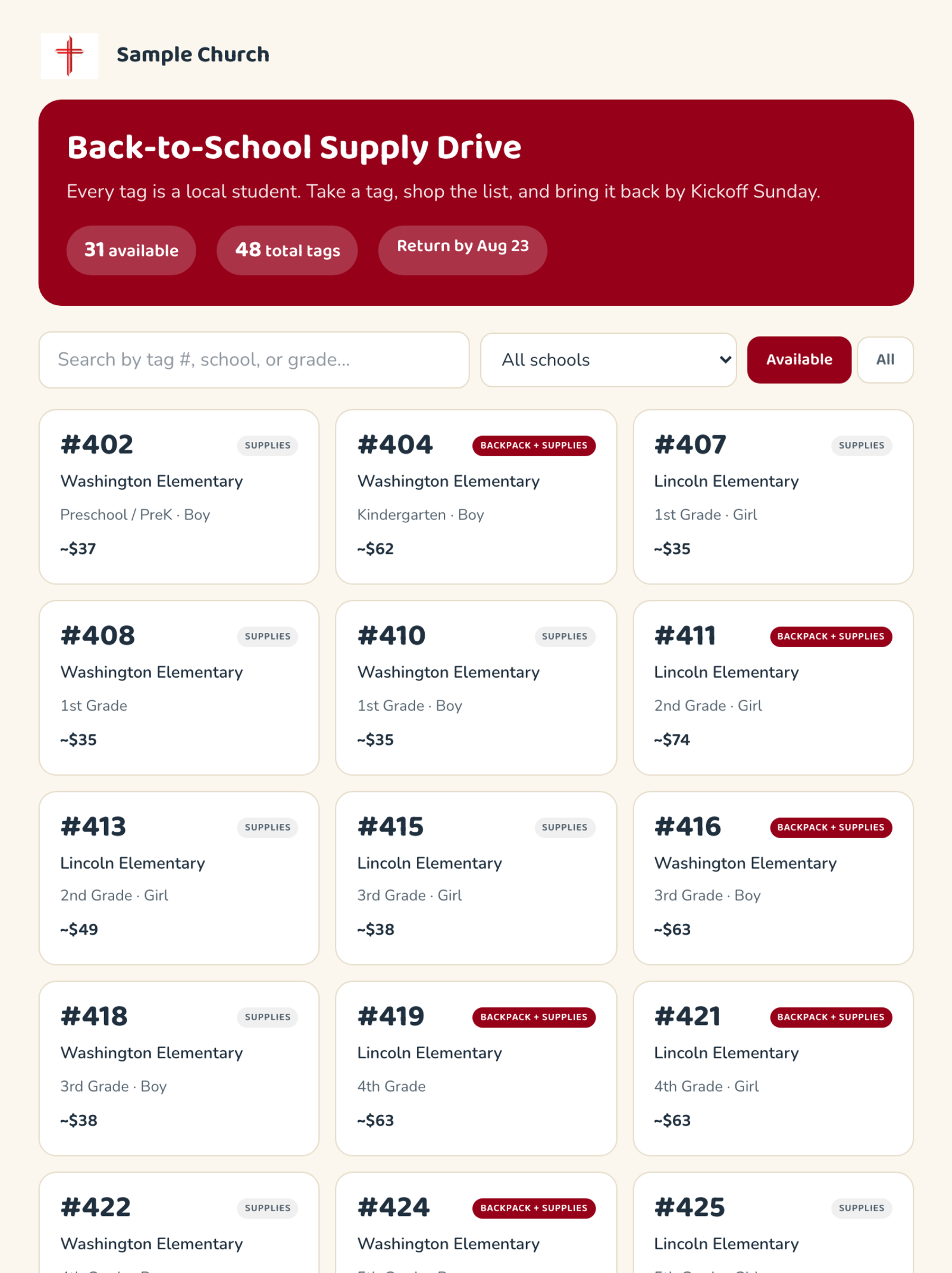
Branded public page — your logo, your colors
No app download or login for members
Search and filter by tag, school, or grade
Claimed tags gray out so nobody doubles up
See the public page live →
Public Drive Page
Church-branded public supply drive page: available tag cards with school, grade and cost estimate, plus search and filters — 31 available of 48 total tags, return by Aug 23
CLAIM & SHOP

A shopping list that lives on their phone.

Scanning a tag opens the student’s grade-specific list. Members claim it with just a name and phone number, then check items off as they shop. Students who need a backpack are flagged right at the top.
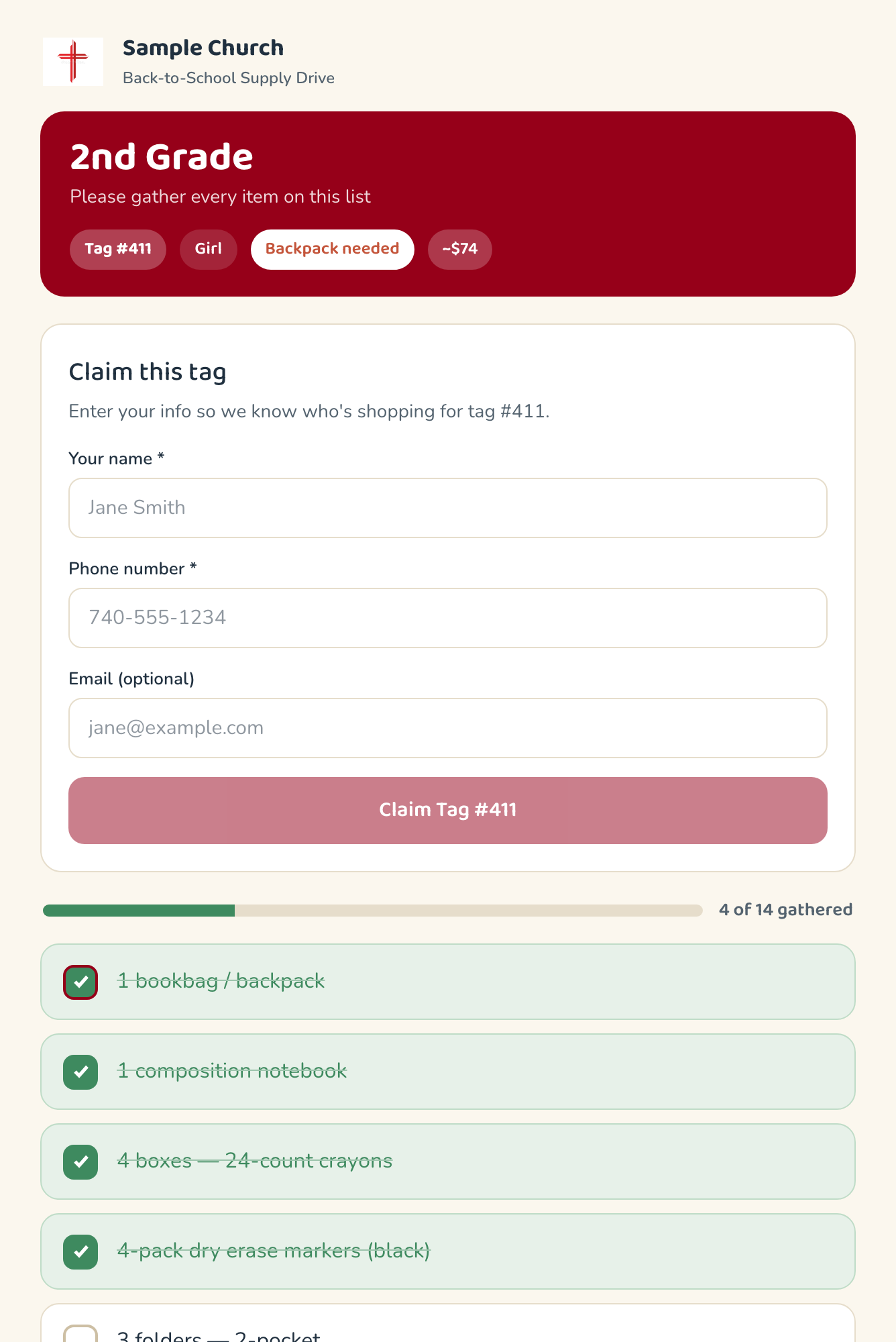
Claim a tag with a name and phone — nothing to install
Interactive checklist with progress as they shop
"Backpack needed" flagged first, with the cost estimate
Print the list or share it — grandparents included
See the claim flow live →
Tag #411 · Supply List
Mobile shopping list for a school supply drive tag: a 2nd-grade supply checklist with a claim form, backpack-needed flag, cost estimate, and progress bar as items are checked off
SCAN RETURNS

Return day is just a scan station.

Give volunteers a PIN-protected scan link — no Ministry Planner account needed. They scan each returning bag’s tag (or type the number), see who claimed it, and mark it returned or delivered on the spot.
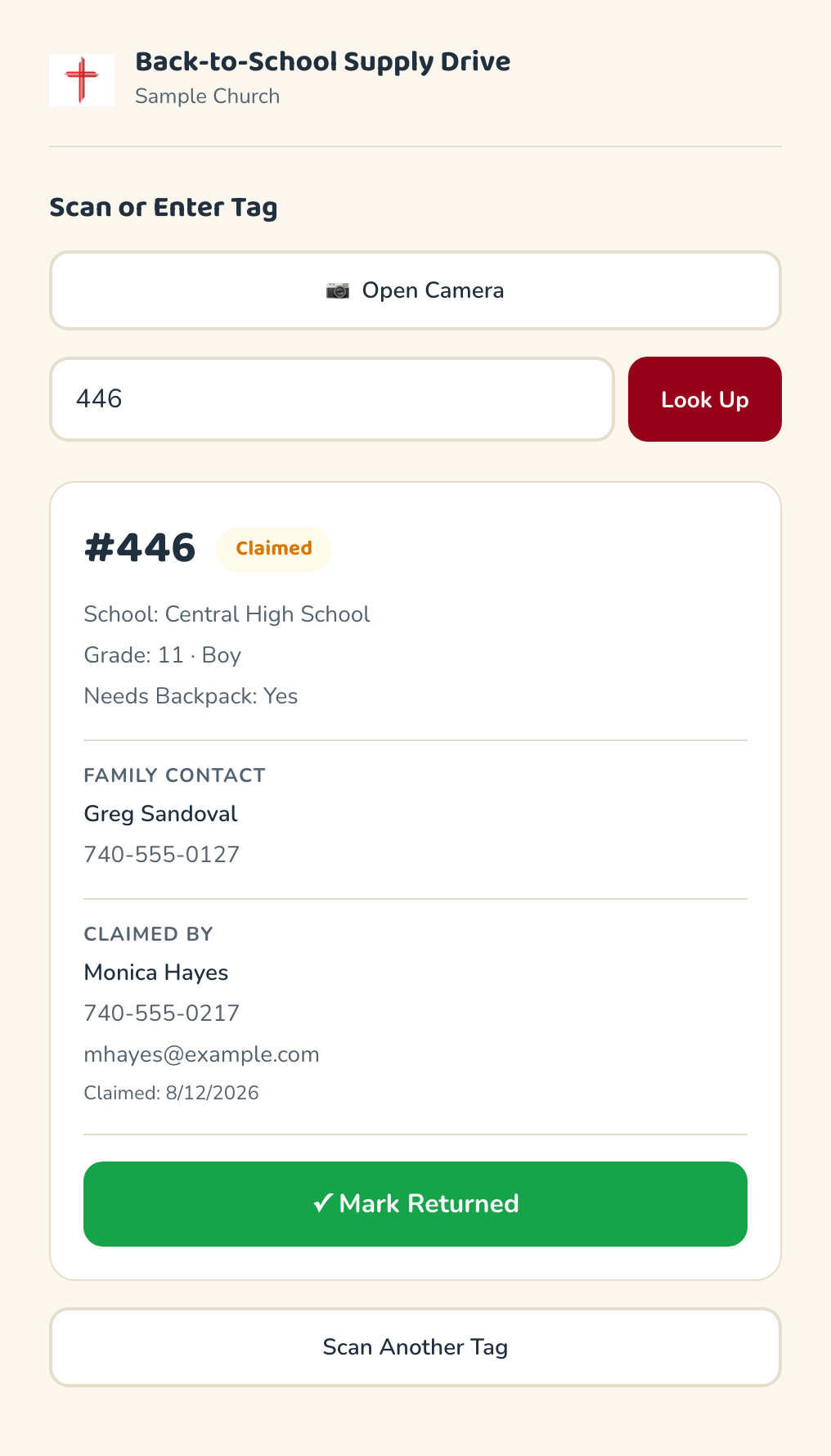
PIN-protected scan link for return-day volunteers
Camera QR scanning or manual tag lookup
Claimer and family contact right on the result card
Mark returned → delivered in one tap
See the scan station live →
Scan Returns
Supply drive return station: a scanned tag showing claimed status, the family contact, who claimed it, and a Mark Returned button — volunteers use a PIN-protected link with no account
TRACK IT LIVE

Watch the whole drive fill up.

The drive board shows every tag moving through available → claimed → returned → delivered, with dollar totals and percent fulfilled. Search by tag, school, grade, or who claimed it. Export everything to CSV when it’s done.
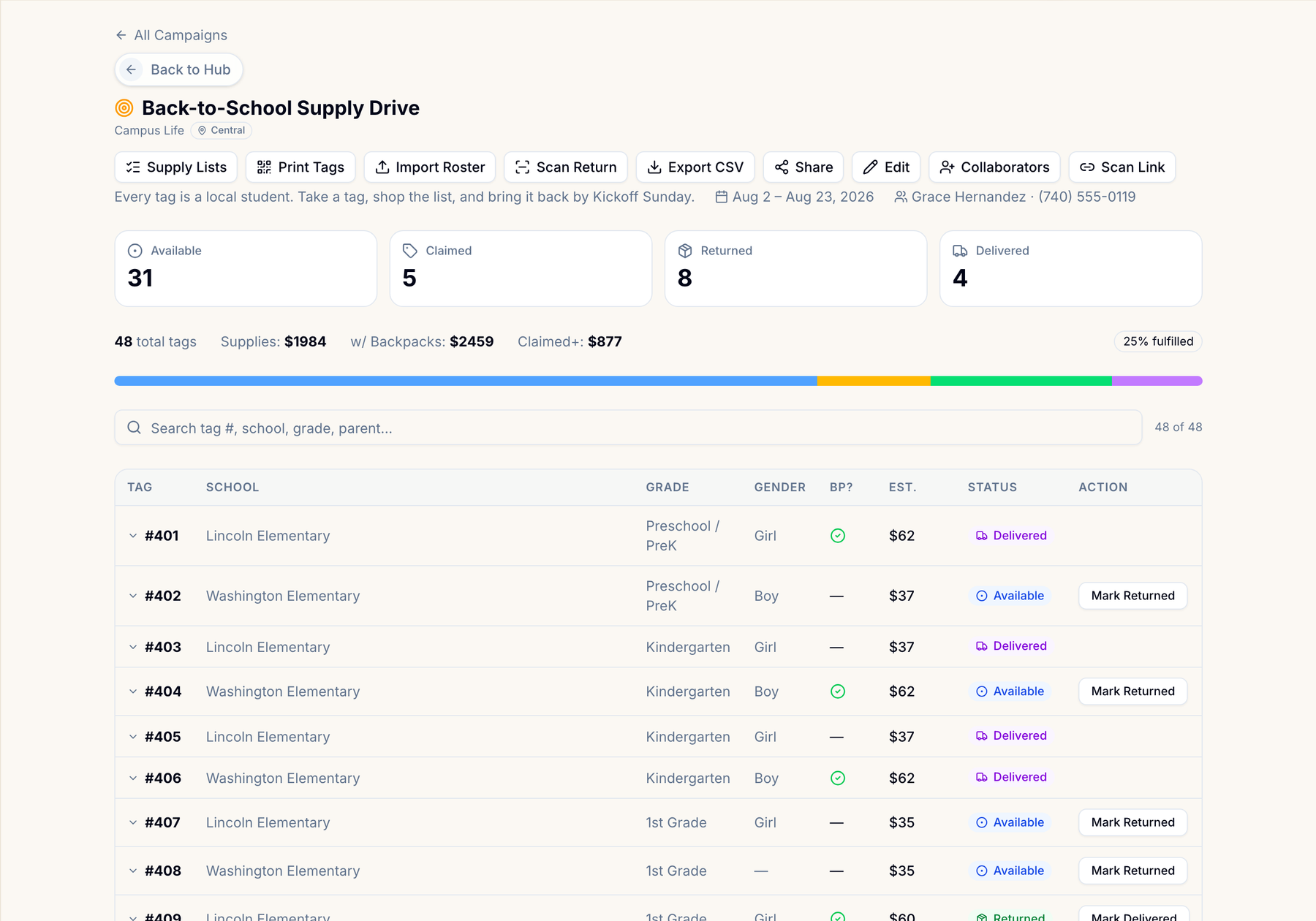
Live pipeline: available, claimed, returned, delivered
Dollar totals and percent-fulfilled at a glance
Search by tag #, school, grade, parent, or claimer
CSV export for thank-yous and next year’s planning
See the drive board live →
Back-to-School Supply Drive
Live church supply drive tracking board: available, claimed, returned and delivered counts, dollar totals, percent fulfilled, and a searchable table of every tag with status and actions

Only need this one thing? School Supply Drive Organizer is free for one drive at a time — no credit card, no expiring trial.

See the free version →

This year, run the drive without the spreadsheet.

Import your list, print the tags, and share one link — in an afternoon.

One flat price for your whole team · Cancel anytime · Set up in an afternoon